Upload via URI
Let your users print their 3D models on their own printers. Upload a 3D models to BuildBee with both public and secure signed URIs.
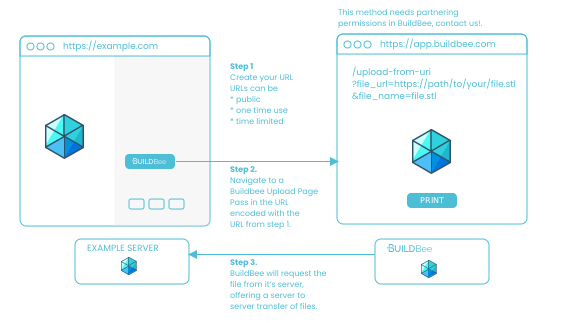
Partners can send files to BuildBee directly using a URL.
Supported file formats
| File Format | Support Level |
|---|---|
| stl | ✅ Supported |
| 3mf | ✅ Supported |
| png | ⚠️ Experimental |
| jpg | ⚠️ Experimental |
| svg | ⚠️ Experimental |
| zips of the above | ✅ Supported |
The Code
Create your download link
When you're ready to send a file to BuildBee, generate a link for BuildBee to read.
-
For publicly accessible files: you're all set!
-
For secure files: create a one time download link. In some CDNs this is called a signed URI, and there are multiple options for setting how many times and/or how long the file can be accessed.
Send your users to the BuildBee Uploads Page
Navigate to the upload-from-uri page with the link to the file, and the name of the file. The URL has the format:
https://app.buildbee.com/upload-from-uri?file_name=XXXXX&file_url=YYYYY
| Parameter | Definition |
|---|---|
file_name |
Human readable name of the file to upload. Encoded with encodeURIComponent. |
file_uri |
Public or secure signed URL to the file on your server. Encoded with encodeURIComponent. |
An Example
Helper function - making BuildBee Upload page URLs
The function below is a helper function to encode a BuildBee upload page url correctly. You can copy this into your code.
// copy this helper function into your code
// to encode your BuildBee upload urls
function createUploadPageUrl({ name, uri }) {
    const encodedName = encodeURIComponent(name);
    const encodedUri = encodeURIComponent(uri);
    const redirect = `https://app.buildbee.com/upload-from-uri?file_name=${encodedName}&file_url=${encodedUri}`
    return redirect;
}
Navigating to the Uploads Page
Using the helper method above, we can easily navigate to BuildBee's upload page.
Get the Uploads Page link
const buildBeeUploadPage = createUploadPageUrl({
    name: "3D Benchy",
    uri: "https://example.com/3dbenchy.stl" // < this can be a signed URL
})
Open the BuildBee Uploads Page
window.open(buildBeeUploadPage, "_blank")
That's it!
When the BuildBee upload page is loaded, our servers will contact your servers and request the URL you passed in. The file is then copied into the customer's BuildBee account and securely stored.